It seems Discobot breaks when it reaches the part of the tutorial where it ass you to mention it in a reply…
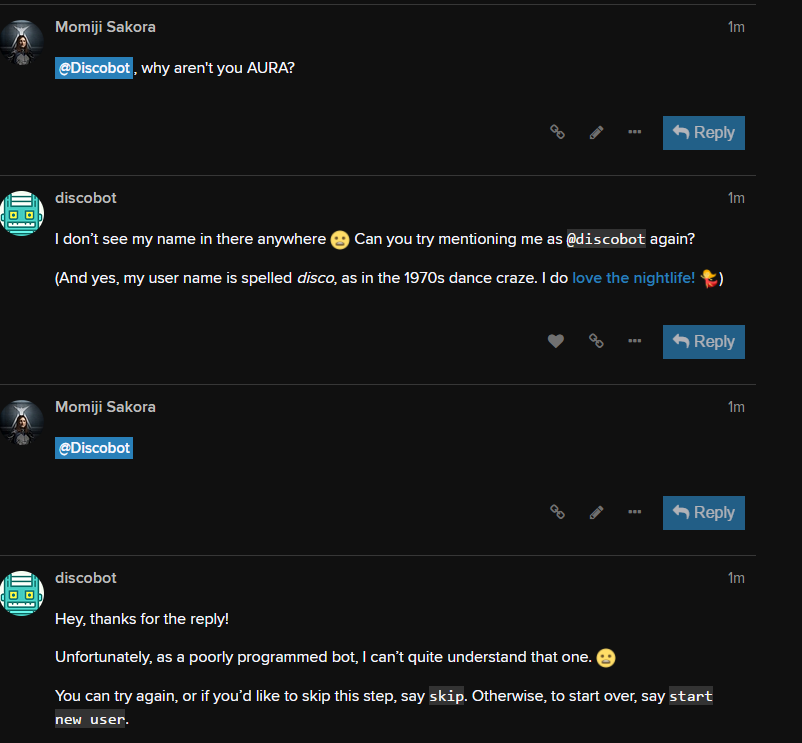
Could it be case sensitive? @discobot worked fine for me.
Hi! To find out what I can do, say @discobot display help.
It also seems the search part of it’s tutorial doesn’t work 
@discobot display help
I currently know how to do the following things:
@discobot start new user
Starts one of the following interactive narratives: new user, advanced user.
@discobot roll 2d6
3, 6
@discobot quote
Carry out a random act of kindness, with no expectation of reward, safe in the knowledge that one day someone might do the same for you — Princess Diana
@discobot fortune
You may rely on it
@Momiji_Sakora did you reply with  after searching? That’s what triggers the next step.
I didn’t sadly - when I tried searching it said no results found 
Hm, strange. The first post by discobot should’ve been edited with the picture of a capybara and some text telling you what to do.
I also had this issue with search. Had to find the beast manually to proceed.
@discobot start new user
@discobot calm down you goof.
Other Tutorial issues:
- Asks to upload picture even if you don’t have the right to do so.
- Asks to undelete a discobot post you can’t see. (Because it’s been deleted?)
The tutorial is pretty neat and I liked it a lot. Except the part that @discobot asked me to upload a picture which is restricted because I am a new user to the forum.
That doesn’t make much sense. The bot should be adjusteed to either ask for an internet link - or the restriction should not be valid in that certain tutorial.
Except that, I really like the Discobot - wondering though, why it doesn’t have any EVE related name like Aura or smth? 
Hi! To find out what I can do, say @discobot display help.
My tutorial pooped the bed after I clicked in my face. I haven’t got another dialogue about it. Boourns.
Loving these custom emotes though. 
And now I am stuck at the “undelete” part. There is nothing showing about that when I click on the “show more” - I feeld dumb now
EDIT: Solved it via “skip” command. Not the best solution though
Why is it collapsed btw? It’s not as there are so many symbols it needs to be smaller anyways ^^

1 Like
The skip command doesn’t even work for me 
There’s a skip command?
Discobot’s tutorials are EVE 2012 style.
Yes, @discobot told me that after I wrote to him several times and he didn’t understood me