Tau_Ra
November 29, 2025, 12:25pm
21
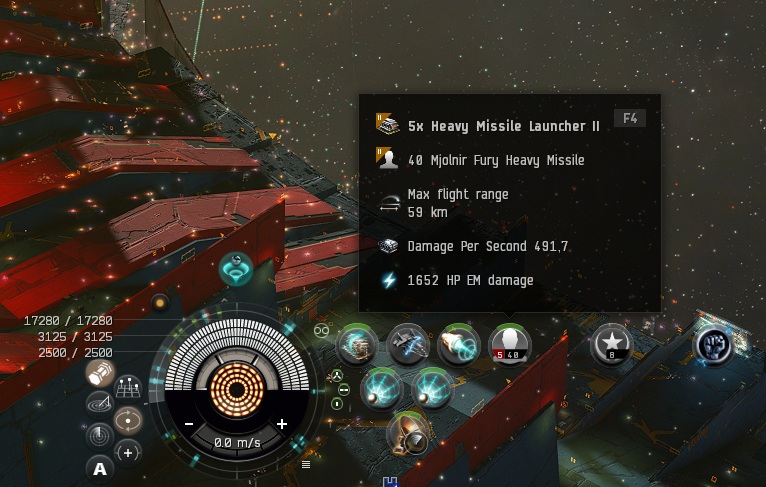
CCP doesn’t have a solution, their only advice is to clear the cache. Sometimes after a while it goes away on its own even without clearing the cache. For some reason, transitions between sectors, undock, etc., location changes access the cache, loading broken icons.
5800x3D + RTX5060Ti
ZeDoctor
December 1, 2025, 9:15am
22
It’s completely random and doesn’t seem to care if you’ve deleted the cache, verified files, or reinstalled the game. All of which I’ve done. I’ve submitted a bug report with a screenshot.
CPU: AMD Ryzen 7 7800X3D
OS: Windows 11
Dec 15, 2025: It still does it.
Al_Kamda
December 1, 2025, 4:54pm
23
Thanks Doc , Ill just keep checking here for any updates
Seung_Koo
December 6, 2025, 3:26pm
24
I have a similar build. 5070 Ti with 9800X3D
This is happening to me as well.
While I was using an Intel CPU with a GTX 960 on windows 10 the issue never appeared.
I changed to AMD 9900X with RTX 5060TI and windows 11 and it started doing it.
Al_Kamda
December 25, 2025, 5:58am
26
keep coming back , only solution i found was logging out and back in.
ocadok
December 26, 2025, 6:51pm
28
BTW it was correct in market until i’ve tried to fit it in simulation. Now it looks like this. I have running two clients simultaneously.
ZeDoctor
December 29, 2025, 1:40am
29
Seconding this, simulating fits has a high chance of causing this bug. Even with one client open, I get this almost daily while playing around with fits.
o7
I switched to dx11 and since then this issue dissapeard.
ZeDoctor
January 14, 2026, 5:50pm
32
Sadly DX11 has freezes on my machine so I’m stuck on DX12 with this bug.
Ake_Chan
January 17, 2026, 1:22am
33
Have this bug for a long time. As I see in the thread, this problem occurs on Ryzen processors?
Jinnfox
January 22, 2026, 11:08am
35
Same issue on new Ryzen 7 9800X3D + RTX 5070 TI.
Cache deletion does fix it temporarily only.
Al_Kamda
January 25, 2026, 4:42am
36
Ok guys seems to be a problem with Rayzen is from what am seeing here and with my own expereince
Tau_Ra
January 28, 2026, 5:26pm
37
new bug ui
duplicating the left navigation panel, what does the purple icon pointing up mean ?
Al_Kamda
January 30, 2026, 5:35am
38
Exilewanted:
nd since th
This solution worked for me switched back to DX11 3 days testing
Switching to DX11 solved this issue for me.
Xanadu_Eve
February 2, 2026, 10:03am
40
I ran into the same issue with my brandnew machine, Ryzen 9800x3d, RTX5080. Never had this on my Intel/GTX1080 before.
Switched to DX11 as recommended, and so far it disappeared.